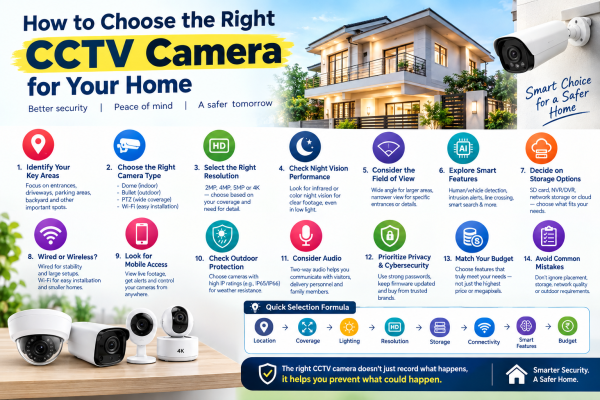
Home security has become an important consideration for homeowners, apartment residents, and property managers. CCTV cameras can help you monitor entrances, outdoor spaces, parking areas, and important areas inside your property.
However, choosing the right CCTV camera isn't simply about buying the camera with the highest megapixel count. The right choice depends on where the camera will be installed, what you want to monitor, lighting conditions, recording requirements, and your budget.
This guide explains key factors to help you choose a CCTV camera quickly and confidently.
1. Begin With Your Security Goals
Before comparing camera models, think about what you want the CCTV system to accomplish.
For example, you may want to:
-
Monitor your front door
-
Keep an eye on your driveway
-
Watch a parking area
-
Monitor a backyard or terrace
-
Check activity around a boundary wall
-
Monitor indoor common areas
-
Receive alerts when someone enters your property
-
Check your home remotely while travelling
Clearly defining your objective makes it easier to decide which features you actually need.
2. Identify Your High-Risk or Important Areas
You don't necessarily need to install cameras everywhere.
Start by identifying locations where surveillance provides the most value. Entrances, gates, garages, driveways, parking spaces, and less-visible outdoor areas are common starting points.
Walk around your property during both daytime and nighttime. Look for spots that are hard to see from inside the house. Also check places where someone could come close without being seen.
This simple exercise can help you determine the number and placement of cameras.
3. Select the Right Camera Design
CCTV cameras are available in several designs, and each can be appropriate for different situations.
Dome Cameras
Dome cameras have a compact shape and are often used indoors or under covered outdoor areas. They can blend into many environments and are useful for monitoring rooms, corridors, entrances, and reception areas.
Bullet Cameras
Bullet cameras have a more visible design and are frequently used outdoors. They can be suitable for gates, driveways, walls, and building exteriors.
PTZ Cameras
PTZ cameras can pan, tilt, and zoom remotely. They can help on larger properties when you need to change the view direction or zoom in on areas.
Wi-Fi Cameras
Wi-Fi cameras can be convenient for apartments and homes where running network cables is difficult. Many models also support smartphone monitoring and motion notifications.
4. Understand Megapixels Before Buying
One of the most common mistakes when buying a CCTV camera is focusing only on megapixels.
A higher resolution can show more image detail.
But results also depend on the sensor, lens, lighting, processing, and installation position.
For residential use, you may encounter cameras with resolutions such as:
-
2MP / Full HD
-
4MP
-
5MP
-
8MP / 4K
A higher-resolution camera can be particularly useful when you need greater detail across a larger area. But a correctly positioned Full HD camera may be perfectly adequate for certain indoor applications.
5. Don't Underestimate Night-Time Performance
A security camera should provide useful footage when lighting is poor.
When comparing cameras, check:
-
Infrared night vision range
-
Low-light performance
-
Color night vision capabilities
-
Built-in illumination
-
Image clarity in darkness
For example, a camera watching a front gate may need better night performance than one in a bright hallway.
Whenever possible, choose a camera based on the actual lighting conditions at the installation location.
6. Think About What You Need to See
Ask yourself whether you need general awareness or detailed identification.
A camera covering a large garden may primarily need to show movement across the area. A camera installed directly above a front door may need to capture clearer details of visitors.
This affects your choice of:
-
Resolution
-
Lens
-
Viewing angle
-
Mounting height
-
Camera distance from the subject
Simply choosing a wide-angle camera isn't always the best solution. A wider image can cover more space but may show distant objects with less detail.
7. Explore Smart CCTV Features
Modern CCTV cameras can include intelligent video analytics that help identify specific events.
Depending on the camera, these features can include:
Human detection: Helps identify people separately from general movement.
Vehicle detection: Can identify vehicle activity in supported areas.
Intrusion detection: Can generate alerts when activity occurs in a predefined area.
Line crossing: Can notify you when someone crosses a virtual boundary.
Smart search: Can make it easier to find relevant events in recorded footage.
These features can make a CCTV system more useful, especially when you do not want alerts for every motion.
8. Decide How You Want Your Footage Stored
Before purchasing a camera, decide how you want recordings to be saved.
Memory Card
Some standalone cameras support MicroSD cards. This can be convenient for smaller installations.
NVR or DVR
For multiple cameras, an NVR or DVR can provide centralized recording and management.
Cloud Storage
Some connected cameras offer cloud recording services. These services let you access footage remotely, based on your provider and plan.
Think about how many days of footage you want to retain and whether you need continuous or event-based recording.
9. Wired vs. Wireless: Which Fits Your Home?
There is no universal answer because both approaches have different practical considerations.
A wired system can be suitable for permanent installations and multi-camera setups where stable network connectivity is important.
A Wi-Fi system can be convenient for smaller installations or locations where running Ethernet cables is difficult.
Remember that wireless doesn't necessarily mean completely cable-free. Many Wi-Fi cameras still require a power connection.
10. Consider Smartphone Access
Remote monitoring is one of the most useful features of modern home CCTV systems.
With a compatible mobile application, you may be able to:
-
View live camera feeds
-
Review recorded footage
-
Receive alerts
-
Use two-way audio
-
Control compatible PTZ cameras
-
Monitor multiple cameras
Before you buy, check if the camera’s app works with your smartphone. Also check if advanced features need a subscription.
11. Outdoor Cameras Need the Right Protection
If you're installing a camera outside, environmental protection matters.
Rain, dust, humidity, sunlight, and temperature changes can affect equipment over time. Check the manufacturer's specifications and IP rating before installing a camera outdoors.
The camera should also be positioned so that water does not collect around connectors or cable entry points.
12. Consider Audio and Communication
Some home security cameras include microphones and speakers.
Two-way audio can allow homeowners to communicate with visitors or delivery personnel without opening the door.
However, audio recording can have additional privacy and legal considerations. Make sure your use of audio features complies with applicable laws and respects the privacy of people being recorded.
13. Don't Forget Privacy and Cybersecurity
Internet-connected CCTV cameras should be protected against unauthorized access.
Good practices include:
-
Create a strong and unique password.
-
Keep camera firmware updated.
-
Update the mobile application regularly.
-
Use a secure home network.
-
Buy cameras from reputable manufacturers and sellers.
-
Review account and sharing permissions.
-
Avoid unnecessary exposure of camera services to the public internet.
Also think carefully about where cameras point. Avoid unnecessarily recording private spaces belonging to household members, neighbors, or visitors.
14. Match the Camera to Your Budget
A good CCTV system doesn't necessarily require the most expensive cameras.
Instead, divide your budget according to your priorities.
For example:
Basic requirement: Full HD camera + night vision + local recording.
Advanced requirement: Higher resolution + AI detection + remote monitoring + larger storage.
Premium requirement: 4K cameras + advanced analytics + professional NVR + comprehensive coverage.
The key is to spend money on features that solve an actual security requirement.
A Simple Formula for Choosing Your CCTV Camera
If you want to make your decision quickly, follow this sequence:
Location → Coverage → Lighting → Resolution → Storage → Connectivity → Smart Features → Budget
For example:
Front gate → Outdoor → Wide coverage → Good night vision → 4MP/5MP → NVR → Human/vehicle detection → Suitable budget
This approach is often more useful than starting with a particular brand or price.
Common Mistakes to Avoid
Buying Only Based on Price
The cheapest camera may not provide the coverage or reliability you need.
Choosing the Highest Resolution Automatically
4K isn't necessary for every location. Consider the actual viewing distance and purpose.
Ignoring Camera Placement
Even an advanced camera can produce poor results if installed at the wrong height or angle.
Forgetting Storage
A camera is only part of the system. Make sure you have enough storage for the desired recording period.
Ignoring Network Quality
For Wi-Fi cameras, a weak wireless signal can affect connectivity and remote viewing.
Installing Indoor Cameras Outdoors
Always check whether the camera is designed for outdoor environmental conditions.
Final Takeaway
The fastest way to choose the right CCTV camera for your home is to start with the area to protect. Then, consider the activity you need to monitor.
Once you know the location, you can choose the right camera design. You can also pick the resolution, lens, and night vision. Decide on storage, connection, and smart features too.
Instead of buying a camera just because it has more megapixels or features, choose one that fits your property's needs.
A well-planned CCTV system can give better coverage, easier monitoring, and more useful recordings. It also helps you avoid paying for features you don’t need.