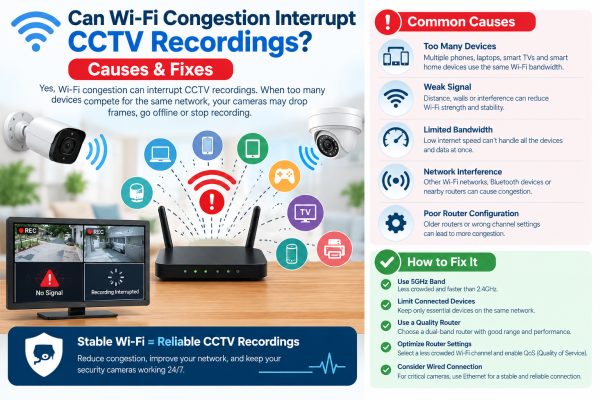
Have you ever opened your security camera app and discovered that some video footage is missing? Or have you noticed your CCTV camera keeps disconnecting when many devices use your home or office Wi-Fi?
Wi-Fi congestion can be one possible reason for these problems. Modern security cameras transmit video continuously or when motion is detected, depending on their settings. When a wireless network becomes overloaded, video transmission may slow down, become unstable, or disconnect temporarily.
However, missing CCTV footage does not always mean your Wi-Fi network is congested. Problems with storage, power, camera configuration, and internet connectivity can also interrupt recordings.
In this guide, we will explain how Wi-Fi congestion affects CCTV systems. We will show you how to find the true cause of recording gaps. We will also cover steps to keep your security monitoring reliable.
1. What Is Wi-Fi Congestion in a CCTV System?
Wi-Fi congestion happens when multiple wireless devices compete for the available capacity of a network. These devices might include smartphones, laptops, smart televisions, gaming consoles, and wireless security cameras.
Every camera transmitting high-definition video requires network resources. When several cameras operate simultaneously, particularly at high resolutions and bitrates, they can place additional demands on the wireless network.
A congested network may experience increased latency, packet loss, and inconsistent data transmission. These conditions can affect live viewing, remote playback, and video delivery to a network video recorder or cloud service.
For example, a shop may have more network interruptions. It may have four wireless CCTV cameras. It may also have several employee smartphones. Its Wi‑Fi network may be busy.
This is more likely than a system running on a well-planned, less crowded network.
2. Can Wi-Fi Congestion Actually Stop CCTV Recordings?
Yes, Wi-Fi congestion can cause recording interruptions. The impact depends on how the camera stores its footage.
Cameras With MicroSD Card Storage
If a camera records to its internal microSD card, it can often keep recording. It may still record when Wi-Fi is congested or disconnected. The camera must remain powered, and local recording must be configured correctly.
In this case, the live view on your phone may freeze, but the recording will still save for later playback.
Cameras Connected to an NVR
Wireless cameras that transmit footage to a network video recorder may experience gaps if the connection becomes unstable. Whether missing footage can be recovered depends on the camera, recorder, buffering capabilities, and recording configuration.
Cloud-Based Security Cameras
Cloud recording depends on successfully transmitting footage over the network and internet connection. Congestion, insufficient upload capacity, or an internet outage can prevent some video from reaching the cloud.
Important: Always check the actual recording timeline and playback history before concluding that Wi-Fi congestion caused the problem.
3. Seven Common Reasons CCTV Cameras Experience Recording Gaps
Wi-Fi congestion is only one possible cause. The following problems can produce similar symptoms.
1. Too many devices using the same Wi-Fi network
Multiple devices can stream videos, download large files, or upload data. They can compete with security cameras for wireless airtime and bandwidth.
2. Weak Wi-Fi signals
A camera installed far from the router may struggle to maintain a stable connection. Thick walls, metal shutters, and multiple floors can further weaken the signal.
3. Interference from nearby networks
Neighbouring Wi-Fi networks and certain electronic devices can interfere with wireless communication, especially when networks use crowded channels.
4. Insufficient upload bandwidth
Cloud-based CCTV systems need sufficient upload capacity to send footage reliably. A fast download speed does not necessarily mean that upload performance is adequate.
5. Unreliable power supply
A bad adapter can restart the camera.
A loose cable can restart the camera.
An unstable power source can restart the camera.
This can cause recording gaps that are not related to Wi‑Fi.
6. Storage problems
A full, damaged, incompatible, or incorrectly configured memory card or hard drive may prevent recordings from being saved properly.
7. Incorrect recording settings
Motion schedules, recording intervals, storage settings, and retention rules can create gaps. This can happen even when the network works correctly.
4. How to Recognise Wi-Fi-Related CCTV Problems
Certain symptoms can help you identify whether network performance may be affecting your security system.
Live View Freezes Frequently
If the video often freezes or loads slowly, your connection may have congestion, interference, or a weak signal.
Camera Status Changes Between Online and Offline
Repeated disconnections may indicate wireless instability. However, check the power supply and router logs as well.
Cloud Clips Are Missing
If cloud recordings have gaps that coincide with network disconnections, upload problems may be responsible. Review the camera's connection history and cloud service status where available.
Local Recordings Are Complete but Remote Viewing Is Poor
This is a useful clue. If the footage on the camera’s memory card is complete, but remote viewing freezes, the issue may be the network.
Several Cameras Fail at the Same Time
If multiple cameras become unstable simultaneously, investigate shared equipment such as the router, access point, network switch, internet connection, or power supply.
5. Practical Ways to Reduce Wi-Fi Congestion for CCTV Cameras
You do not always need to replace your entire surveillance system to improve performance. Start with these practical measures.
Position the Router Correctly
Place the router or access point in a central, elevated position where possible. Avoid hiding it inside metal cabinets or behind thick walls.
Add a Suitable Access Point
For larger homes, shops, offices, and warehouses, a well-placed access point can improve coverage. It can also spread wireless traffic more evenly.
A Wi-Fi extender may help in some cases, but it will not fix network congestion or low capacity on its own.
Choose the Right Wi-Fi Frequency
The 2.4 GHz band usually has better range and goes through walls better.
The 5 GHz band can be faster, but it works best at shorter distances. Use a band supported by your camera and appropriate for its location.
Optimise Camera Video Settings
Review resolution, frame rate, and bitrate settings. If the network cannot reliably support every camera at its current bitrate, carefully adjusting settings may reduce network demand.
Maintain enough image detail to identify people, vehicles, and other important events.
Separate CCTV Traffic Where Practical
A dedicated Wi-Fi network or access point can reduce competition with everyday devices. However, separation alone will not fix weak signals, inadequate capacity, or interference.
Check Router Capacity
If your router slows down when you use several cameras and other devices at the same time, you may need a stronger router. It should be able to handle more devices. It should also handle heavy video traffic.
6. Should You Choose Wired CCTV Instead of Wi-Fi Cameras?
The best option depends on the property, installation requirements, and importance of uninterrupted recording.
Wireless CCTV cameras are convenient when running cables is difficult. They work well in many homes and small setups, especially when you have local storage and reliable Wi‑Fi.
Wired CCTV systems generally provide a more predictable data connection. IP cameras that use Power over Ethernet (PoE) can send video and get power through one Ethernet cable.
This reduces the need to rely on wireless signals.
For retail shops, offices, warehouses, and other locations, reliable recording matters.
A well-planned wired system may be a better choice.
A wired connection does not eliminate every possible failure. Power outages, storage faults, incorrect settings, and equipment problems can still interrupt recording.
7. How to Troubleshoot CCTV Recording Drops Step by Step
Follow this checklist before buying a replacement camera or router.
-
Check the recording timeline: Identify the exact times when footage is missing.
-
Inspect local storage: If supported, check whether the memory card contains continuous footage during the affected period.
-
Review network status: Look for camera disconnections, weak signal levels, or router errors.
-
Test near the router: Temporarily move the camera closer, if practical, and see whether the connection becomes more stable.
-
Check network activity: Determine whether other devices are consuming substantial bandwidth when the problem occurs.
-
Inspect power and cables: Look for loose connections, overheating adapters, or unexpected restarts.
-
Review recording settings: Confirm the schedule, motion detection settings, storage capacity, and overwrite configuration.
-
Test a wired connection: Where supported, use Ethernet to help determine whether the wireless connection is the main issue.
If the issue continues, check the camera maker’s troubleshooting guide. You can also ask a CCTV technician to inspect the network and recording setup.
8. How Can Businesses Maintain Reliable CCTV Recordings?
Businesses should treat recording reliability as part of their overall security planning.
A good CCTV setup should include appropriate camera placement, adequate network capacity, reliable power, compatible storage, and correctly configured recording schedules.
For key areas like shop entrances, cash counters, stockrooms, and office doors, use continuous local recording or an NVR. Don’t rely only on cloud connectivity.
Regularly review your recordings. Confirm that the correct footage is saved. Set up recording health alerts if your equipment supports them.
These checks can reveal problems before an incident occurs. They also reduce the risk of missing footage when you need it most.
Conclusion
Wi-Fi congestion can interrupt CCTV recordings. This is more likely when cameras use wireless connections. These connections may link to an NVR or to cloud storage. Symptoms may include frozen live views, repeated disconnections, and gaps in remotely stored footage.
However, not every recording problem is caused by network congestion. Weak signals, internet upload limitations, power interruptions, storage faults, and recording settings should also be investigated.
To improve reliability, optimise Wi-Fi coverage, manage network traffic, verify local or cloud storage, and consider wired CCTV cameras for critical locations. Most importantly, check recorded footage regularly to ensure your surveillance system is actually capturing the events you need.
For homes, shops, and offices in Ghaziabad, Indirapuram, Noida, and Delhi NCR, choosing the right CCTV system helps. Proper setup can provide more dependable security monitoring.