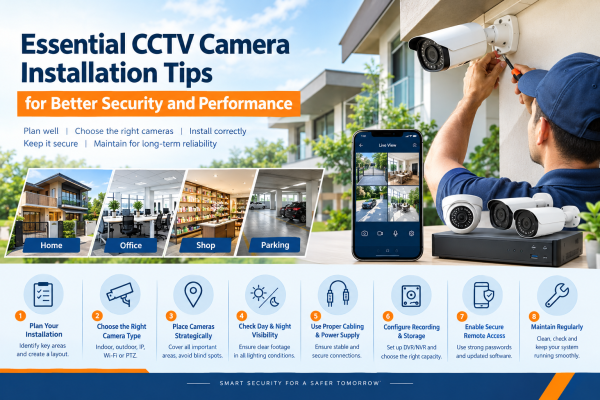
A reliable CCTV camera system can help protect your home, office, shop, or commercial property. It provides continuous monitoring and recorded video footage. However, the effectiveness of a surveillance system depends on more than just the quality of the cameras. Proper installation, correct positioning, reliable connections, and suitable recording settings are equally important.
Many security problems occur because cameras are installed without considering blind spots, lighting conditions, storage requirements, or network connectivity. Following the right CCTV camera installation tips helps you avoid these issues. It also helps you build a surveillance system that meets your security needs.
In this guide, we will explore practical ways to plan, install, configure, and maintain CCTV cameras for better security.
1. Prepare a CCTV Installation Plan
Before purchasing equipment, inspect your property and determine which areas require surveillance. A clear installation plan helps you identify the number of cameras needed and choose suitable locations.
For homes, consider the main entrance, staircase, parking area, backyard, and other accessible entry points. For offices and shops, prioritise reception areas, cash counters, stockrooms, entrances, and corridors.
Draw a simple layout of your property and mark the proposed camera positions. This will help you identify areas that require additional coverage and reduce unnecessary equipment costs.
2. Select Cameras According to Your Property
Not every CCTV camera is suitable for every environment. Your selection should depend on the installation location, lighting conditions, viewing distance, and level of detail required.
Here are some common options:
-
Indoor dome cameras: Ideal for offices, shops, reception areas, and indoor spaces.
-
Outdoor bullet cameras: Suitable for gates, building entrances, parking spaces, and boundary areas.
-
IP CCTV cameras: Provide network-based video monitoring and can support advanced surveillance features.
-
Wi-Fi CCTV cameras: Useful where suitable wireless connectivity is available.
-
Audio-enabled cameras: Provide sound recording or two-way communication when supported by the model.
Before buying a CCTV camera, check its resolution and lens specs. Also check weather protection, night vision, and compatibility with your current equipment.
3. Avoid Blind Spots With Strategic Placement
One of the best tips for installing CCTV is to place cameras in the right spots.
Put them where they can record clear, useful video.
Focus on key areas you want to monitor.
Install cameras to cover entrances, exits, pathways, and other important locations. Avoid placing them where walls, furniture, trees, or decorative objects obstruct the view.
Do not assume that one wide-angle camera can cover every part of a large room or outdoor area. Although a wide field of view covers more space, distant people and objects may look too small to identify.
Test the camera's viewing angle before permanently fixing its position. Make adjustments until important areas are visible without unnecessary overlap or uncovered sections.
4. Check Daylight and Nighttime Visibility
A camera that provides clear footage during the day may perform differently at night. Strong sunlight, shadows, reflections, and insufficient illumination can affect image quality.
For outdoor installations, check whether the camera faces direct sunlight or vehicle headlights. Use suitable camera positioning and lighting to minimise glare.
If nighttime monitoring is important, consider infrared night vision or colour night vision. The appropriate option depends on the lighting available and the level of detail required.
Always test your cameras after dark before completing the installation. Check whether faces, entrances, vehicles, and movement remain sufficiently visible.
5. Choose Between Wired and Wireless CCTV Systems
Both wired and wireless CCTV systems can provide useful security, but they have different installation requirements.
Wired CCTV systems generally require physical cables for video transmission, networking, or power, depending on the system design. They can be a good choice for permanent installations where reliable cabling is practical.
Wireless CCTV systems reduce the need for video cables. However, they still need power unless designed to run without it. Their performance depends on wireless signal strength, interference, and network reliability.
Consider the building layout, installation budget, power availability, and future expansion plans before choosing between wired and wireless cameras.
6. Use Proper Cabling and Electrical Connections
Poor cable management can affect video quality and cause intermittent disconnections. During installation, use compatible cables, connectors, and power supplies that meet the equipment manufacturer's specifications.
For wired systems, plan cable routes that protect connections from moisture, physical damage, and accidental interference. Secure exposed cables where appropriate and avoid leaving loose wiring around walkways.
For IP cameras that use Power over Ethernet, check that the network switch or NVR supports the needed PoE standard.
Also confirm it has enough power budget.
Electrical connections should be installed safely. Outdoor equipment should have proper weather protection. A qualified professional should handle mains electrical work when required.
7. Configure the DVR or NVR Correctly
The recording device is an essential part of a CCTV system. A DVR is commonly used with compatible analogue cameras, while an NVR is generally used with IP cameras.
During setup, verify that every camera is connected properly and that the recording device recognises it. Configure the correct date, time, resolution, frame rate, and recording schedule.
You can choose continuous recording, motion-triggered recording, or both. This depends on system features and security needs.
After configuration, play back recorded footage from different cameras. This confirms that the system is not only displaying live video but also recording usable evidence.
8. Calculate the Required Storage Capacity
The storage you need depends on camera count, resolution, frame rate, compression, recording mode, and retention time.
A system that records all the time uses several high-resolution cameras. It usually needs more storage than motion-based recording.
Before purchasing a hard drive, estimate how many days of footage you want to retain. Choose a compatible surveillance-rated drive with sufficient capacity for your expected workload.
Check the recording device often to make sure it saves footage correctly and avoids storage errors.
9. Set Up Secure Mobile Monitoring
Mobile viewing allows authorised users to check live footage and access recordings through a compatible smartphone application.
To set up remote monitoring, follow the manufacturer’s instructions. Confirm your camera system, recording device, and network support the required features.
For better security:
-
Replace default passwords with strong, unique credentials.
-
Keep firmware and applications updated.
-
Restrict system access to authorised users.
-
Enable additional authentication features when available.
-
Review account permissions periodically.
A CCTV system may continue recording locally without internet access if it is designed for local recording. However, viewing footage remotely from outside the property usually requires an internet connection or another suitable remote-access arrangement.
10. Protect Privacy and Secure Camera Access
CCTV installation should balance security with the privacy of residents, employees, customers, visitors, and neighbours.
Position cameras to focus on your property and the areas that genuinely require monitoring. Avoid capturing neighbouring private spaces unnecessarily.
Audio recording requires particular care because it may raise additional privacy concerns. Enable this feature only when appropriate and consider the applicable legal requirements.
Protect recorded footage with access controls and secure credentials. Follow relevant Indian laws, applicable data-protection requirements, and building or society rules.
11. Test the Complete System Before Handover
Once installation is complete, conduct a thorough system check. Testing helps identify problems before you begin relying on the cameras for everyday security.
Confirm that:
-
Every camera displays a clear live image.
-
All cameras record successfully.
-
Playback works for the expected time period.
-
Night vision performs as intended.
-
Motion detection and notifications work when configured.
-
Mobile monitoring is available to authorised users.
-
Blind spots have been minimised.
-
The recording device shows the correct date and time.
It is also helpful to explain basic controls to the property owner or responsible staff member. This includes how to search recordings and export relevant footage.
12. Maintain Your CCTV System Regularly
A CCTV installation is not a one-time task. Regular maintenance helps preserve image quality and reduce the risk of unexpected failures.
Clean camera lenses carefully, inspect mounting brackets, check exposed cables, and review recorded footage periodically. Look for signs of water ingress, loose connections, blocked views, or unusual recording interruptions.
Keep software updated and review user access when staff members or property responsibilities change.
A simple maintenance schedule can help ensure that your surveillance equipment remains ready when you need it.
Benefits of a Properly Installed CCTV System
A well-planned CCTV system can offer several practical benefits:
-
Improved visibility around entrances and important areas.
-
Recorded footage to support incident investigations.
-
Remote monitoring where supported.
-
Better oversight of business operations.
-
Greater awareness of activity around the property.
-
More organised security monitoring.
CCTV does not guarantee crime prevention, but a properly configured system can support a broader security strategy.
Conclusion
Installing CCTV cameras correctly is essential for achieving dependable surveillance. From choosing the right cameras and removing blind spots to planning wiring and setting up storage, each step matters. Secure remote access and regular maintenance also help the system run well.
Before installing a CCTV system, assess your property's security needs and select equipment that matches your environment and budget. For complex installations, professional guidance can help ensure that cameras, cabling, recording devices, and network settings work together effectively.
If you need CCTV camera solutions for your home, office, shop, or commercial property, GR CCTV Solutions can help. We can help you find options that fit your needs.
Frequently Asked Questions
1. What is the most important CCTV installation tip?
Plan camera placement before installation. Identify key areas, check for blind spots, and make sure cameras give clear views in day and night conditions.
2. Is professional CCTV installation better than DIY installation?
DIY installation may work for simple camera kits. Professional installation can be beneficial for larger properties, multiple cameras, complex cabling, network configuration, and systems requiring dependable recording.
3. Can CCTV cameras record continuously?
Yes. Many DVR and NVR systems support nonstop recording, if the equipment is set up correctly. They also need enough storage and power.
4. How can I improve CCTV camera image quality?
Choose a suitable resolution and lens. Position cameras carefully and provide good lighting. Keep lenses clean and use compatible recording settings.
5. Do CCTV cameras need regular maintenance?
Yes. Periodic checks of lenses, cables, power supplies, recording status, storage capacity, firmware, and camera positioning help keep the system operating reliably.